

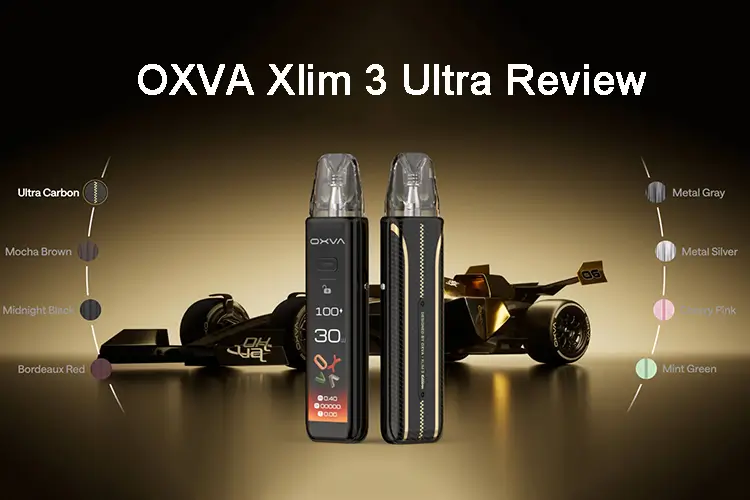
A new pod system only matters if it beats the one already in your pocket. That was my question when the OXVA Xlim 3 Ultra arrived. For the past few weeks, I’d been using the Xlim Pro 3, which was OXVA’s model before. Now there’s an Ultra, and the name alone doesn’t tell you whether it sits above or beside the Pro.
I’ve owned four Xlim devices: the Xlim Pro 2, the Pro 2 DNA edition, the Pro 3, and now the Ultra. That history gave me a clear baseline. I also tested the Ultra with the same e-liquid I use for every device comparison, so the results come from the hardware rather than a new flavor.
This review covers the unboxing, design, touchscreen, settings, Eco mode, and real-world performance against the Pro 3.
What Is the OXVA Xlim 3 Ultra?
The OXVA Xlim 3 Ultra is a refillable pod system. Unlike a disposable, you fill the pod with your own e-liquid, recharge the battery via USB-C, and replace the pod when the coil wears out.
It’s part of OXVA’s Xlim line, which is known for slim, simple pod devices with adjustable wattage. The Ultra keeps that formula but adds a much bigger touchscreen, a premium finish, and a more advanced menu system.
A quick definition: Wattage is how much power the device sends to the coil. Higher wattage usually means warmer vapor, more flavor, and a stronger hit. The Ultra goes up to 30 watts.
Specifications
- Device type: Refillable pod system
- Max wattage: 30W
- Battery: 1500mAh
- Charging: USB-C (bottom port)
- Weight: 90g
- Size: 28.9mm x 16.5mm x 121.9mm
- Airflow: Adjustable slider on the side
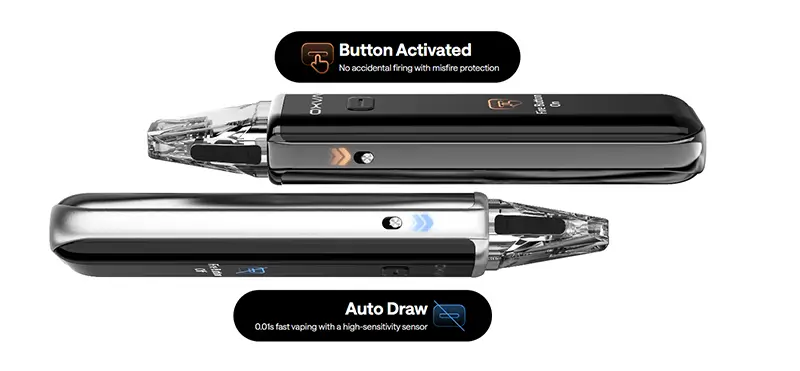
- Lock switch: Yes, side-mounted to prevent accidental firing
- Display: 2.2” HD Large animated touchscreen with swipe-based controls
- Power on/off: 5 clicks
- Eco mode: Yes, for battery saving
- Pod type: 3ML Xlim-compatible pods (pull-up rubber plug fill design) / 2ml (TPD)
- Coil resistance detection: 0.6 ohm / 0.8 ohm automatic on pod insertion
- Auto & Button Draw
Unboxing: What’s in the Box
The packaging feels premium from the start. The box uses gold lettering, and all the key details are printed on the front and back.
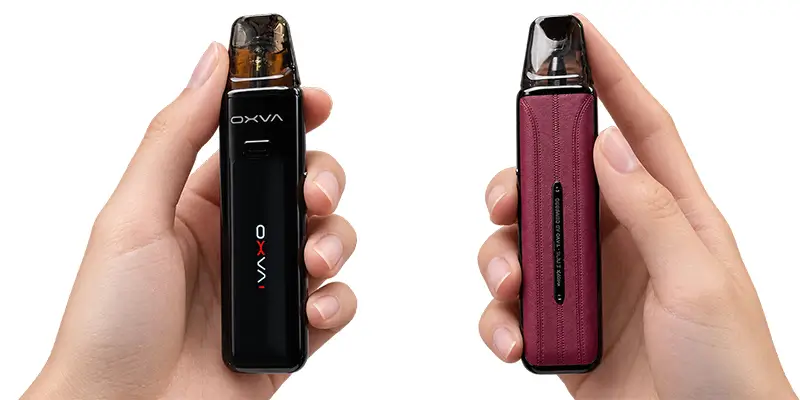
My unit is listed as Bordeaux Red. Out of the box, the front looks black, which confused me for a moment. Flip it over, though, and you’ll find the red on the other side. It’s a deep, rich shade rather than a bright fire-engine red, and I like it a lot.
Inside, you’ll find:
- 1 x XLIM 3 ULTRA Device
- 1 x XLIM Top Fill Cartridge 0.6Ω 3ml (Pre-installed)
- 1 x XLIM Top Fill Cartridge 0.8Ω 3ml
- 1 x Type-C Cable
- 1 x User Manual
- 1 x Quick User Guide
- 1 x Use Suggestion Card
Nothing in the box is surprising, but it covers everything you need to get started.
Design and Build Quality
This is where the Ultra makes its first strong case.
Faux Leather Finish
The Pro 3 uses the standard metal body most pod systems have. The Ultra adds a faux leather panel on one side, which gives it a much classier look. It feels less like a gadget and more like a well-made accessory.
Controls and Ports
The layout is clean and easy to learn:
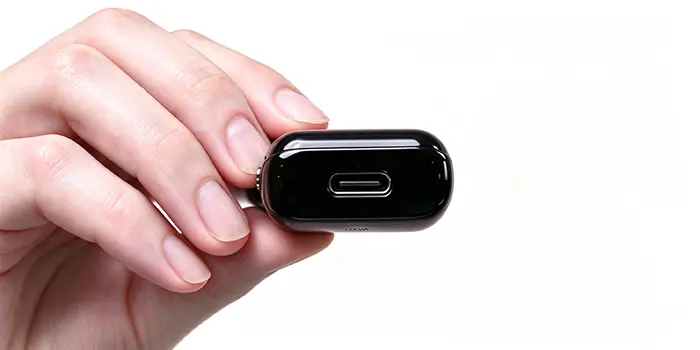
- USB-C port on the bottom for charging
- Airflow adjustment on the side, so you can tighten or loosen the draw
- Lock switch on the opposite side to prevent accidental firing
- One button that works as both a select and back button in the menus
To power it on, click the button five times. There’s a short delay before the screen wakes up, so give it a second.
Size and Weight vs. the Xlim Pro 3
Side by side, the Ultra is slightly wider than the Pro 3. The difference is small, just a hair, but you can see it when they sit next to each other.
It’s also heavier, and that extra weight works in its favor. The Ultra feels noticeably sturdier in the hand. The Pro 3 is lighter and slimmer, but the Ultra feels more solid and better built.
So what? If you want the lightest, slimmest device possible, the Pro 3 still has an edge. If you prefer a device that feels substantial and premium, the Ultra wins.
Pods and Filling
Pod Compatibility
I’d stocked up on Xlim pods from my Pro 2 days, and those pods also work in the Pro 3. Naturally, I hoped they would fit the Ultra too. The Ultra uses the same style of Xlim pod, but check OXVA’s official compatibility list before you buy extra pods. That way you know exactly what will work with your device.
The Filling Design
This is my one real complaint. The Ultra still uses the same pull-up rubber plug on the pod. You lift the plug, fill the pod, and press it back down.
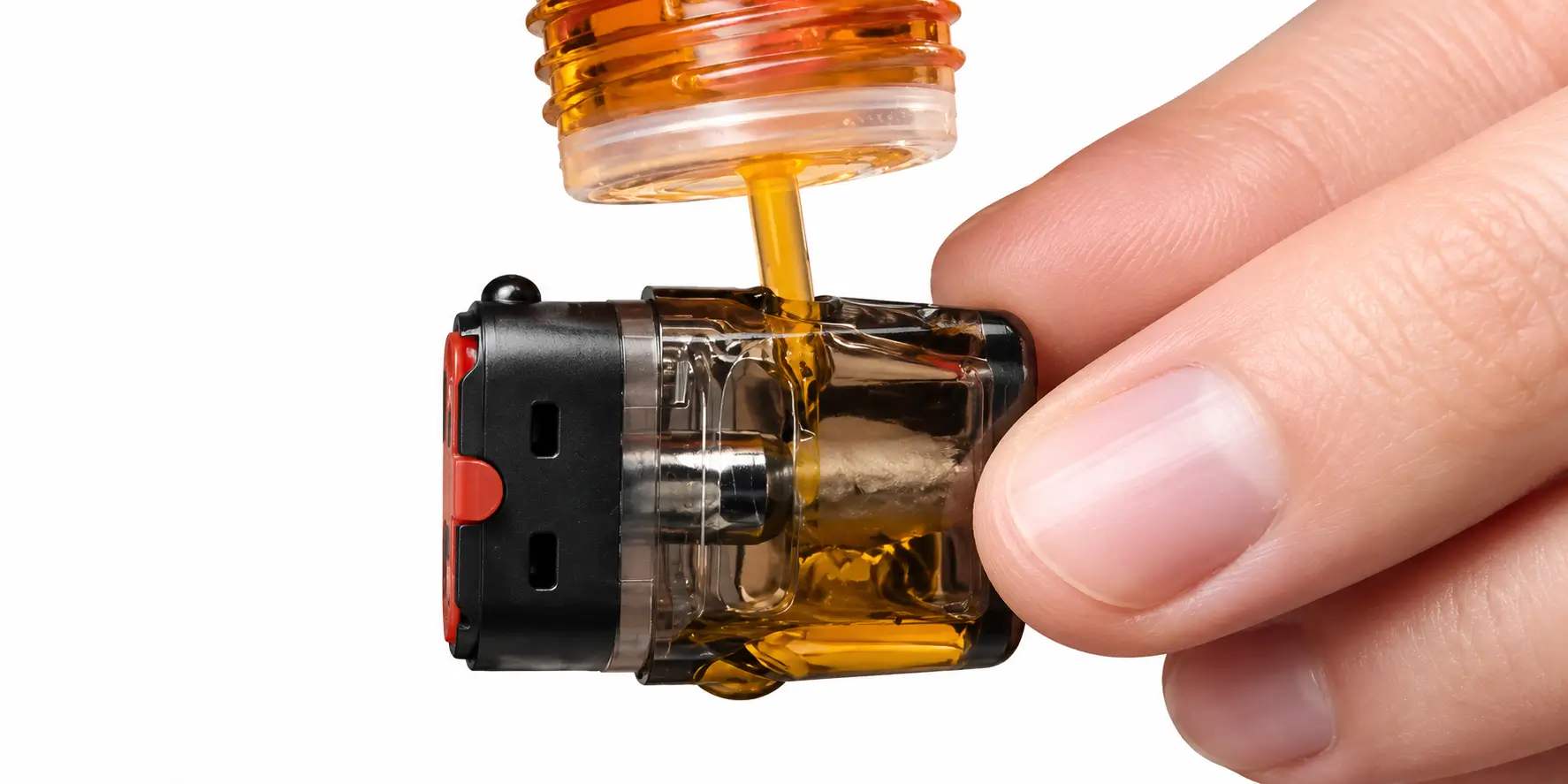
It works, but it’s not my favorite design. Many reviewers, including me, have asked for a spring-loaded fill port where you simply push the bottle tip in. Those designs don’t spill and are faster to use. OXVA stuck with the older approach here.
Tip: After filling a new pod, let it sit for a few minutes before vaping. That gives the cotton time to soak up the liquid and helps prevent dry hits.
When I inserted the pod, the Ultra recognized the coil resistance right away and briefly showed it on screen. It’s a small detail, but it confirms the pod is seated correctly.
Screen and Touchscreen Interface
The screen is the Ultra’s biggest upgrade, and it isn’t close.
A Bigger, Animated Display
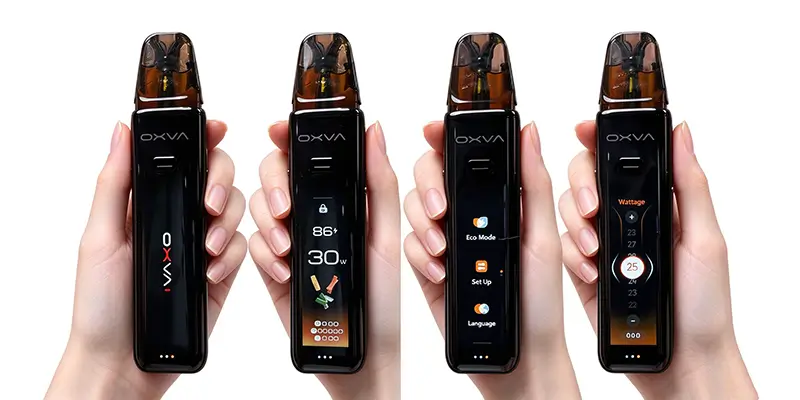
Compared with the Pro 3, the Ultra’s screen is much larger. It’s also animated. At first, I thought the movement was glare, but it’s an actual animation. It looks great and makes the Pro 3’s screen feel outdated, even though that device was the newest option just weeks earlier.
Touch Controls
The screen is fully touch-controlled, and it works a lot like a smartphone. The touch response is very sensitive. You don’t need to press hard. A light swipe is enough.
You’ll also feel a small vibration as you move through settings, which confirms each input.
Settings and Navigation Gestures
Every main function is tied to a swipe direction. Once you learn the gestures, it’s fast and intuitive.
- Slide to unlock: Swipe across the screen to wake it, just like a phone.
- Swipe right: Adjust wattage, up to 30W.
- Swipe up: Choose a vaping animation. There are several, and I went with a cloud-style option.
- Swipe left: Open the puff recorder to view your usage history.
- Swipe down: Open the settings menu.
Inside the Settings Menu
The settings menu includes:
- Eco mode for lower power use
- Screen settings, including brightness and screen timeout
- Vibration mode
- Theme and animation options
- An on-device guide that explains the controls
That built-in guide is a smart touch. If you forget a gesture, you don’t need to dig out the manual. To leave a sub-menu, just press the button to return to the main screen.
Reader checkpoint: If the touch controls feel unfamiliar at first, start with the on-device guide. It takes less than a minute to walk through.
Real-World Performance
Battery Performance and Charging
The battery held up well during everyday use, though it isn’t exceptional. For most sessions, a full charge lasted a solid stretch of regular vaping at 25 watts. That said, heavy users who vape frequently throughout the day may reach for the cable sooner than expected. The USB-C port on the bottom makes charging straightforward, and the included cable works fine. Charging speed felt reasonable, though OXVA doesn’t publish an exact charge time on the packaging.
One practical advantage the Ultra has over standard disposables is the side lock switch. You can lock the device when it’s in your pocket or bag, which prevents accidental firing and unnecessary battery drain between sessions. That small feature makes a real difference in day-to-day battery management.
If you’re running low on battery and can’t get to a charger right away, switch on Eco mode. It reduces output and extends your remaining charge, which is exactly what it’s designed for. Just know that standard mode is noticeably better for flavor and vapor, so Eco mode is a backup, not a daily setting.
I test every device with the same e-liquid: a strawberry jelly donut flavor I’ve vaped in more devices than I can count. Using the same liquid makes it easier to tell how much of the experience comes from the device itself.
Smooth, Quiet Hits
At 25 watts, the Ultra delivered a very consistent hit from start to finish. Some pod systems crackle, sizzle, or give off a buzzing feel during a pull. The Ultra was almost silent. Each hit felt smooth and controlled.
Balanced Flavor and Nicotine
This is where the Ultra really impressed me. With some devices, this liquid tastes mostly like nicotine with very little flavor. With others, the nicotine barely comes through.
On the Ultra, both came through in balance. The jelly donut flavor was rich and clear, and the throat hit was there without being harsh. It landed right where I like it.
Eco Mode Impressions
Eco mode keeps the device in a low-power state to save battery. When you turn it on, the screen layout changes, though it still showed 25 watts on my unit.
In practice, the difference was subtle at first. The output felt a little softer. Once I switched Eco mode off, the difference became clear. Standard mode gave me more vapor, more throat hit, and more flavor.
Decision rule:
- Use Eco mode when your battery is running low and you won’t be near a charger for a while.
- Use standard mode for everyday vaping. It’s the better experience by a wide margin.
OXVA Xlim 3 Ultra vs. Xlim Pro 3
Here’s how the two compare:
- Design: The Ultra’s faux leather panel looks more premium than the Pro 3’s all-metal body.
- Size: The Ultra is slightly wider.
- Weight: The Ultra is heavier and feels sturdier.
- Screen: The Ultra’s screen is much bigger, animated, and touch-controlled.
- Controls: The Ultra uses swipe gestures for wattage, animations, history, and settings.
- Pods: Both use the Xlim pod style with the same pull-up fill plug.
- Performance: The Ultra delivered an exceptionally smooth, quiet, and balanced hit with my test liquid.
The Pro 3 is still a good device. But everything OXVA improved from the Pro 2 to the Pro 3, it improved again with the Ultra.
Pros and Cons
Pros
- Faux leather finish looks classy and premium
- Sturdier build with a solid, substantial feel
- Large, animated touchscreen with sensitive response
- Fast swipe-based controls
- Adjustable wattage up to 30W
- Puff recorder, brightness, vibration, and theme settings
- Built-in on-screen guide
- Automatic coil resistance detection
- Smooth, quiet, and consistent hits
- Balanced flavor and nicotine delivery
- Adjustable airflow and a side lock switch
Cons
- Same pull-up rubber plug fill design
- Slightly wider and heavier than the Pro 3
- Eco mode noticeably reduces flavor and vapor
- Touch controls may take a few minutes to learn
Who Should Buy the OXVA Xlim 3 Ultra?
Buy it if you:
- Own an older Xlim and want the most refined version yet
- Like a premium-looking device with a solid feel
- Want a modern touchscreen with easy, customizable settings
- Care about smooth, balanced flavor with a moderate throat hit
Consider the Pro 3 if you:
- Want the slimmest, lightest device possible
- Don’t care about touch controls or a larger screen
Final Verdict
The OXVA Xlim 3 Ultra is the best Xlim I’ve used, and I’ve owned four. It looks better, feels sturdier, and has a dramatically better screen than the Pro 3. Most importantly, it delivered one of the smoothest, most balanced hits I’ve had from my go-to test liquid.
The old-style pod fill is still a letdown, and Eco mode is best saved for low-battery moments. Neither issue takes much away from an excellent device.
My recommendation: If you’re using the Xlim Pro 3 or an older model, the Ultra is worth the upgrade. Run it in standard mode around 25 watts, give new pods a few minutes to soak, and use the on-screen guide to learn the gestures quickly.
This product is intended for adults 21+ only. Nicotine is an addictive chemical. Vaping is not recommended for non-smokers, pregnant or nursing women, or anyone with a health condition.
